
Reachable
Know when your internet is actually working — and prove it.
macOS shows when you're connected to WiFi, but not whether you actually have internet. Reachable sits in your menu bar and monitors your connection every 2 seconds. When it goes down, you'll know instantly. When you call your ISP, you'll have proof — PDF export showing exactly when, how long, and what happened.
Get Started
Up and running in under a minute.
No setup. No account. No permissions drama.
Download from the App Store
One-time $0.99 purchase. No subscription, no IAP.
A welcome screen shows you around
It points out the icon in your menu bar and what it tells you. Then a dot appears — green means online — and Reachable monitors every 2 seconds, silently.
See every outage — and prove it
Visual timeline, uptime %, and one-click PDF export ready for your ISP.
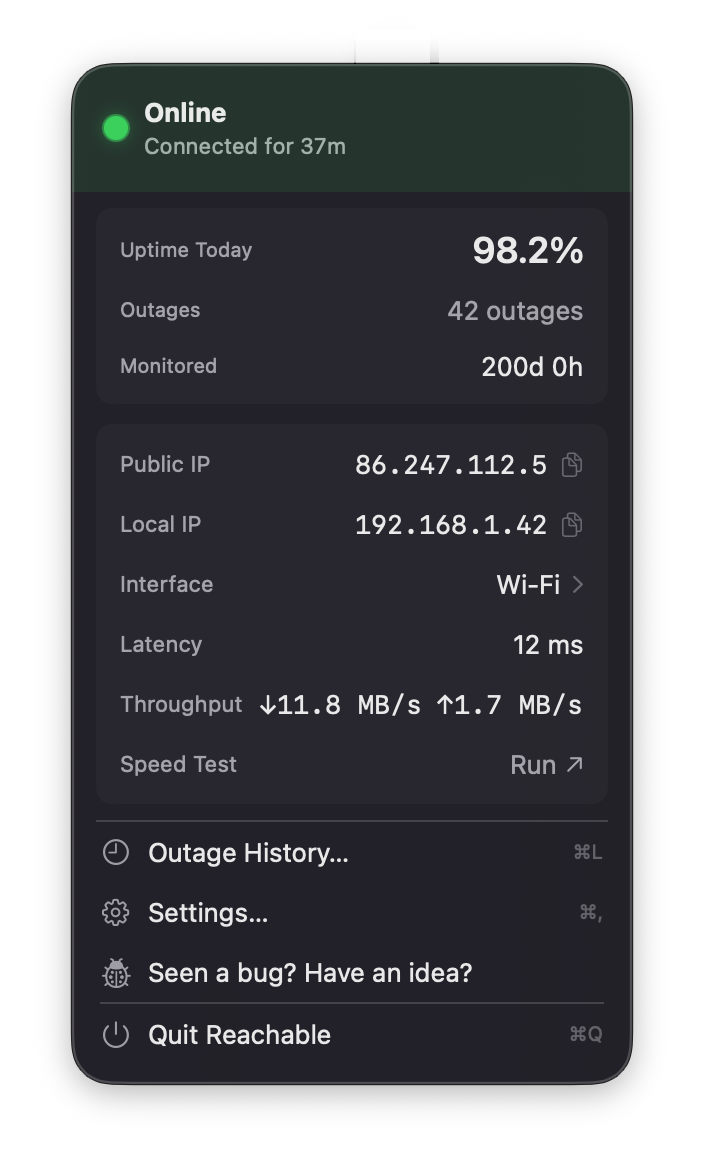
Menu Bar App
Live status, always honest.
Latency, throughput, uptime, and network details — always one click away. Color-coded for instant recognition.
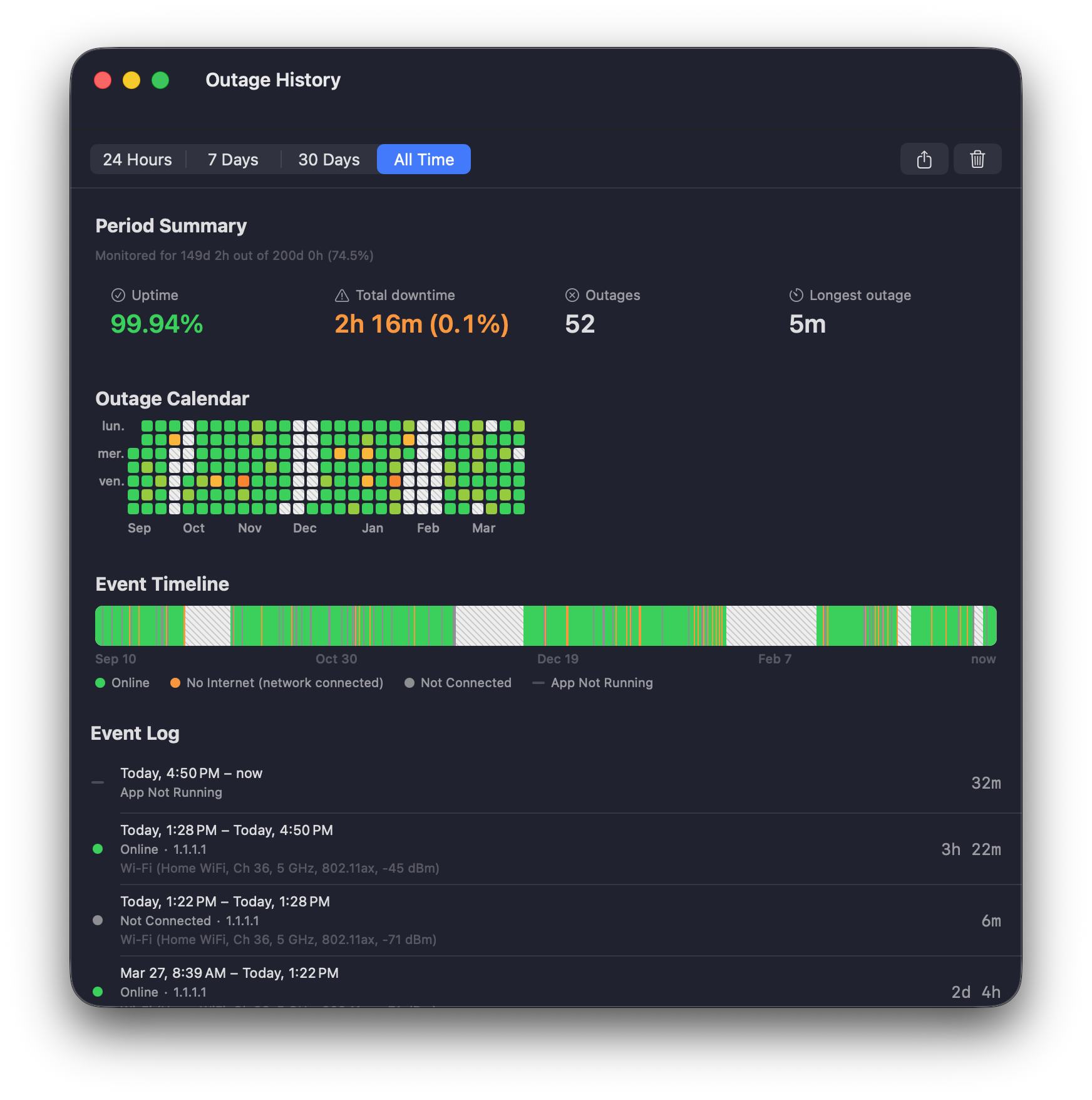
Outage History
Every outage, logged and exportable.
Visual timeline, calendar heatmap, and detailed event log. Export as PDF or CSV — screenshot-ready for your ISP.
Desktop Widgets
Status on your desktop.
Small and Medium sizes. Status and today's uptime %, always visible. The medium size adds a 24-hour outage timeline.
Stop guessing whether it’s your Wi-Fi.
Reachable watches your connection so you don’t have to — and hands you the proof when your ISP says “everything looks fine on our end.”


$0.99 · one-time · no subscription
Features
- One glance, all you need: a compact arc-and-dot icon in your menu bar. Online shows a checkmark badge; no internet shows a cross badge; not connected shows dimmed arcs. Works even without color. Optional colored mode adds green, orange, and grey tinting.
- No notification spam: Reachable waits for 2 consecutive failures (about 4 seconds) before alerting you. One hiccup won't wake you up at 3 AM. You can also mute notifications for brief outages under 30 or 60 seconds.
- Know your real uptime: daily uptime percentage, outage count, and monitored duration — calculated only for time the app was actually running, so the number is always honest.
- Prove your outages: every outage is logged with timestamps, duration, and network details (WiFi signal, SSID, channel, band, protocol). Visual timeline shows connectivity over 24h, 7 days, 30 days, or all time.
- Export the proof: PDF & CSV reports show your full timeline — online, no internet, not connected, and not-monitored periods. The PDF is screenshot-ready for ISP support. The CSV has 11 columns for full analysis.
- Full network details: public & local IP (click-to-copy), live throughput (download & upload), WiFi signal strength with dBm, channel, band (2.4/5/6 GHz), protocol (802.11ac/ax), Internet latency, and one-click speed test via LibreSpeed.
- Captive portal detection BETA: on hotel or airport Wi-Fi, Reachable detects when a login page is blocking your connection and shows a button to open it — faster than waiting for macOS.
- Works with VPNs and hotspots: correctly handles ProtonVPN, WireGuard®, and other VPN clients. Detects mobile hotspots automatically. Brief drops on hotspots are explained in context.
- Smart about sleep/wake: pauses when your Mac sleeps, resumes with a grace period on wake. No false outages from WiFi reconnection. The timeline honestly shows "not monitored" periods in grey.
- Desktop widgets: Small widget shows status and today's uptime. Medium widget adds a 24-hour timeline bar with outage segments and downtime summary. Both update in real time.
- Nothing to configure: a welcome screen on first launch shows you where to look and what the icon means. Notifications are asked for there, with the reason in plain sight — never as a system alert out of nowhere.
- 10 languages: English, French, German, Spanish, Japanese, Chinese, Portuguese, Italian, Korean, Dutch.
- Native macOS: Swift + AppKit. No Electron. Runs silently in your menu bar. Accessible: distinct badge shapes for each state, legible without relying on color.
Why Reachable
ISP-ready proof
Visual timeline + PDF export with timestamps, duration, and WiFi details. No other app gives you a report you can send to your ISP.
No noise
No false outages from WiFi switches or wake-from-sleep. No review prompts, no ads, no cross-promotion. Reachable only alerts you when something is actually wrong.
Native & beautiful
Built with Swift and AppKit, not Electron. Rich popover with live stats, desktop widgets, and a design that feels like it belongs on your Mac.
Rich reports
PDF report with visual timeline, uptime stats, and WiFi details per outage — SSID, channel, band, protocol. CSV with 11 columns for full analysis. Ready to send to your ISP or keep for your records.
Works with VPNs
ProtonVPN, WireGuard, and other clients work correctly. The market leader breaks with VPNs — showing "offline" while you're browsing. Reachable detects VPN tunnels and reports status accurately.
$0.99, once
One-time purchase. No subscription, no IAP. Competitors charge $4.99+ for less. Your outage data stays on your Mac — no cloud, no account, no tracking.
How Reachable compares
| Reachable | Typical paid app | Free alternatives | |
|---|---|---|---|
| Outage history with export | PDF & CSV | Basic .txt | CSV only |
| Visual timeline | Timeline + calendar heatmap | None | Calendar heatmap |
| Daily uptime % | Honest (monitored time only) | None | None |
| Live throughput | ↓↑ real-time | Yes | None |
| VPN compatible | Yes | Broken | Not tested |
| False outage prevention | Reconnecting state | None | None |
| Nag popups & ads | Never | Frequent | None |
| Privacy | No tracking | Varies | Open source |
| Interface | Rich popover + widgets | Basic menu | Basic menu |
| Desktop widgets | Small & Medium | None | None |
| App Store distribution | Yes | Yes | No |
| Languages | 10 | 1–21 | 1 |
| Price | $0.99 | $4.99+ | Free |
FAQ
How does Reachable check connectivity?
Every 2 seconds, Reachable sends a lightweight HTTPS request to a server (Google by default, but you can pick from Cloudflare, Apple, Quad9, or a custom address) to check if your internet works. If it gets a response, you're online. If it doesn't, something is wrong. Simple and reliable.
What are the different states?
Online: your internet is working. No Internet: you're connected to a network but can't actually reach the internet — the classic "WiFi says connected but nothing loads" problem. Not Connected: no network interface available — normal when WiFi is off or no cable is plugged in.
Will I get too many notifications?
No. Reachable waits for 2 failed checks in a row (about 4 seconds) before alerting you. A single hiccup won't trigger anything. You can also mute notifications for brief outages under 30 or 60 seconds in Settings.
What export formats are available?
PDF and CSV. Both show your full timeline — online, no internet, not connected, and not-monitored periods — not just outages. The PDF includes a visual timeline bar, uptime percentage, and WiFi details — ready to screenshot and send to your ISP. The CSV has all the raw data for spreadsheet analysis.
Does Reachable track me?
No. The only network requests are the connectivity check, a public IP lookup, a country flag lookup when you open the popover, and captive portal detection. No analytics, no telemetry, no tracking. Your outage data stays on your Mac and never leaves it.
What about sleep/wake?
Reachable pauses when your Mac sleeps and resumes when it wakes. The timeline honestly shows "not monitored" periods in grey, and your uptime percentage only counts time the app was actually running — so the number is always truthful.
How does captive portal detection work? BETA
When you connect to hotel or airport WiFi, you often need to open a login page before you can use the internet. macOS sometimes detects this, but it can be slow. Reachable catches it within seconds and shows a button to open the login page directly. When the regular check fails, a separate lightweight probe detects the portal and switches the status immediately.
I'm on a mobile hotspot and see brief outages. Is that normal?
Yes. Phone hotspots frequently experience micro-drops due to cellular signal changes. Reachable detects the hotspot automatically and explains this in the outage history. You can mute notifications for brief outages (under 30 or 60 seconds) in Settings — the timeline still records everything.
Why should I use this instead of macOS built-in tools?
macOS shows whether you're connected to a network, but not whether your internet actually works. You can be "connected" with no internet access — that's exactly what Reachable catches. Plus, macOS doesn't log outages. Reachable records every one so you can prove it happened.
What if the app has a bug?
Reachable is built with Apple's native frameworks (the same ones macOS uses internally). If something doesn't work as expected, you can use the bug report button or reach us directly at contact@reachable-app.com — we take every report seriously and aim to fix issues quickly.
Does Reachable show download/upload speed?
Yes. The popover shows live throughput (↓/↑ MB/s) in real time. This uses your network interface's byte counters — no extra network requests. It's only active when the popover is open, so there's zero CPU impact otherwise. For a full speed test, click "Speed Test" to open LibreSpeed (or Cloudflare / Speedtest.net — configurable in Settings).
Are there desktop widgets?
Yes. A Small widget shows status and today's uptime percentage. A Medium widget adds a 24-hour timeline bar with outage segments and downtime summary. Both update in real time and link back to the app when tapped.
Is it a subscription?
No. $0.99 one-time purchase. No IAP, no ads, no subscription. Ever.
Available on the Mac App Store
Less than a coffee. No subscription. No ads. No IAP. Just a reliable utility that stays in your menu bar.